Timber Cladding That Reads as Real Material, Not a Texture Sticker.
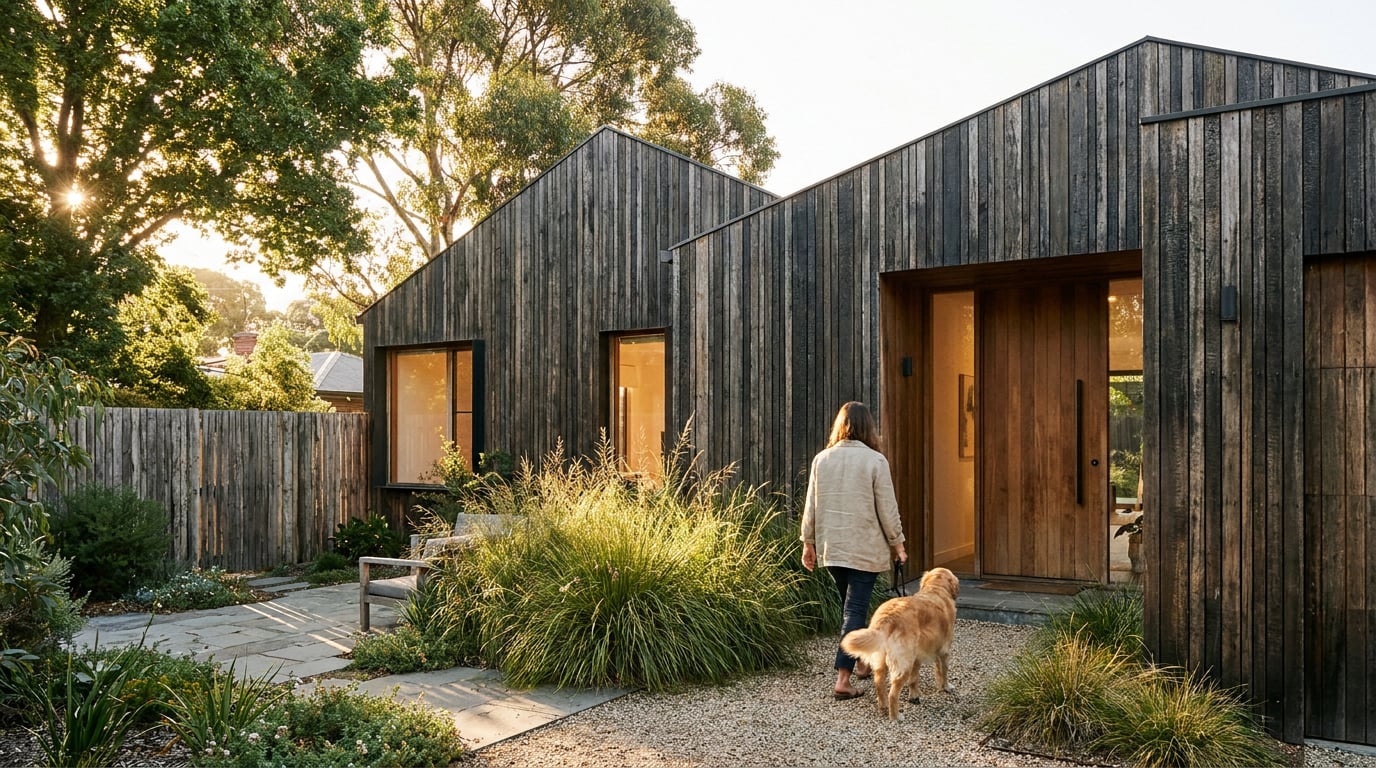
Timber fails in renders when it is flat, uniform and perfectly lit. Here is how to build in the variation, light response and detail that make cladding believable.
Why timber gives itself away as a sticker

A timber façade fails in seconds, and it fails in the same three ways. The grain repeats. Every board is the same colour. The surface ignores the light falling on it. Any one of these is enough to make cladding read as wallpaper at crit distance, and most failed timber renders have all three.
Real timber varies plank to plank in tone, figure and sawn texture. A single tiled image cannot do that, however good the photograph it came from. Viewers also bring a lifetime of memory to cladding. Everyone has stood next to a real timber building, so small errors register even when nobody can name them. They just feel wrong.
The three tells
- Repeating grain. The same knot or figure appearing every few boards, usually visible as a diagonal pattern across a large elevation.
- Uniform colour. Every board the same tone, saturation and finish, as if cut from one piece and cloned.
- Light-blind surface. No board relief, no soft sheen, no response to the sun direction. The pattern sits on top of the building instead of belonging to it.
Decide what the material is first
"Timber cladding" is not one material. Vertical shiplap, an open-gap rainscreen, charred larch and weathered cedar behave differently and need different treatment. Shiplap has overlapping profiles and tight shadow lines. An open-gap rainscreen shows a dark cavity and battens behind each gap. Charred larch is matt, deep and slightly uneven, with a sheen that shifts at the edges of each board. Weathered cedar silvers unevenly and carries tonal streaks. Decide which one you are drawing before you touch a texture, because each one fails in a different way.
Name the cladding type before you render it. Shiplap, open-gap rainscreen, charred larch and weathered cedar each need their own variation, sheen and shadow logic.
Build the variation before you render

The most reliable fix happens in the model, not in post. Specialist archviz guidance recommends splitting cladding into board-width UV islands and varying value, saturation and roughness per board, using a multi-sub or element-based material setup. That is the structural answer to repetition: build the variation into the surface rather than hoping a single seamless tile survives scrutiny.
If you are working from a SketchUp or Linea massing model, remember that new geometry arrives as a flat painted colour, never as a texture. A new wall is white. Floors and roofs are light grey. The timber finish is something you add deliberately in render, not something the model supplies. That is useful to remember, because it means nothing in the model is quietly pre-deciding your material for you.
Break repetition at source
- Vary board width. Even a modest range reads as milled timber rather than a pattern.
- Offset joints. Staggered end joints on horizontal boards, varied lengths on vertical ones.
- Shift tone board to board. A small variation in value and saturation per board is worth more than any amount of grain detail.
- Keep scale honest. Grain that is too large or too fine against the board width is the fastest route to a toy-model look. Check it against a board you can picture in your hand.
Stage the colour story
Fresh timber reads warm and orange. Silvering timber goes grey and uneven. A scheme at planning stage usually wants the day-one look, because that is what is being consented. A competition or long-term landscape image might show the building at ten years. Choose one and say so, rather than landing somewhere vague between the two.
Weathering is directional
Weathering is not an even wash. It is heavier at the base from splash-back, streaked below sills and copings, and lighter under deep eaves where rain never reaches. The same guidance suggests a roughness range of roughly 0.7 to 0.8 for weathered boards, with the grain driving bump detail, while sheltered boards stay smoother and slightly glossier. Treat that as a practical specialist recommendation rather than a universal physically based rendering standard. The principle is what matters: weathering changes how a board reflects light, not just what colour it is.
| Cladding type | Tone variation | Surface response | Typical giveaway |
|---|---|---|---|
| Vertical shiplap | Gentle, board to board | Tight shadow lines, soft sheen | Flat, gapless surface |
| Open-gap rainscreen | Moderate, with dark cavity | Visible battens, deep gaps | Gaps with no depth behind them |
| Charred larch | Subtle, deep and uneven | Matt, edge sheen shifts | Uniform black, plastic gloss |
| Weathered cedar | Strong, silver and streaked | Rough, directional staining | Even grey wash from top to bottom |
Introduce board-level variation in the material setup before relying on any post-processing. Fixing a repeating tile afterwards is always harder than not building one.
Let light do the convincing

Light is where timber either comes alive or collapses. Raking light at a low angle shows board relief, shadow gaps and sawn texture. Flat overcast light removes that depth and can expose a pasted-on pattern. That is a useful test rather than a rule: no source establishes a universal best sun angle, and overcast light does not always weaken timber. Compare the same façade under low-angle sun, diffuse overcast and interior artificial light, and check whether board relief, joints and roughness stay legible in each.
What tells the eye the cladding has thickness
- Shadow lines between boards and at joints.
- Reveals at corners and openings, showing the depth of the build-up.
- Soft, varied sheen. Oiled, stained and raw-sawn timber each reflect differently, and a uniform gloss is a plastic tell.
Test light on a finished still
Once you have a still you like, Retouch offers six one-click re-light presets: Golden hour, Dusk, Blue hour, Night, Overcast and Sunny. Each regenerates the whole document at a different time of day or weather as a new layer, so the original stays untouched. Run the cladding through all six and look for the one that sells the material best. Often it is not the one you rendered first. Treat the results as a way of comparing how the surface holds up under different light, not as proof the timber is physically correct.
Interiors need a different approach
A lit timber panelling wall or slatted ceiling wants warm bounce and controlled highlights, not a blown-out wall. Check that the slats keep individual shadow and tone rather than merging into a single bright band. The same logic applies to joinery and furniture-scale material studies: if the board relief disappears under the light, the material reads as laminate.
Do not pick the light you like. Pick the light under which board relief, joints and roughness are still legible, and test at least three.
Detail that sells the build, not just the surface
A convincing surface on an unresolved junction still fails. Credibility lives at the places where the cladding stops or changes: corner details, window reveals, soffit meeting wall, and the base where the cladding meets the ground. These are the first places a planner or a client will look, because they show how the thing is actually built.
Junctions and fixings
Board gaps, ventilation battens, shadow gaps and fixings all read as signs of a resolved scheme. An open-gap rainscreen with no visible batten behind it looks unfinished. A corner with no return looks like a cut-out. Be honest about what an image-editing pass can and cannot do here. Retouch's Material swap replaces a selected surface while preserving the existing geometry and lighting, which makes it useful for comparing cedar against larch. It does not prove that corner returns, sill flashings, ventilation cavities or fixings have been modelled correctly. That check is yours.
Context sells timber
Timber sits in a place. Planting, wet ground, adjacent brick or render for contrast, and entourage at the correct scale all help cladding feel like part of a site rather than a swatch. A dark charred façade reads very differently against a pale render neighbour than against a hedge.
Avoid the clean-room mistake
A faint dirt line at the base, a tonal shift under a gutter or a slightly uneven stain is more believable than perfection. Real buildings are not clean. A small amount of controlled imperfection is one of the quickest ways to move a render from clinical to credible.
Match detail to stage
- Concept visuals can stay loose. Soft junctions are acceptable when the idea is the point.
- Planning and competition images need the junctions to hold up at full size. If a reviewer can zoom in, they will.
For related thinking on pitching detail to the right stage, the piece on what RIBA Stage 2 and 3 visuals should look like is a useful companion.
Concept images can be loose. Planning and competition images cannot. Make sure the junctions hold up at the size the image will actually be seen.
Fix and finish in Retouch with Image and Shoot
You do not have to get every board right in one pass. A sensible workflow is to generate the exterior, check whether the timber holds up, then correct the weak stretches rather than regenerating everything.
A practical finishing sequence
- Generate the exterior. Image, or Shoot, produces a set of camera angles for a scheme as complete stills. Check whether the timber holds up on these before you invest in anything else.
- Enhance area. Select a soft or repetitive stretch of cladding and re-render it at higher resolution. It takes no prompt and composites back through your selection, which suits wide renders that have gone soft or started to repeat.
- Material swap. Attach a reference photograph of real timber and replace the cladding texture to match it. The result sits on its own toggleable layer, so you can flip against the original and judge honestly whether it improved.
- Select by description, then grade. Type something like "all the timber cladding" to select every matching region, then use the Adjust panel's texture, clarity and HSL bands as a maskable adjustment layer. This is the quickest way to pull tone variation back into a surface that has gone too even.
The same approach suits interior work: comparing oak against walnut panelling, or a slatted ceiling in two finishes, on separate layers before anything is shown to a client. The practical benefit is a quick, honest comparison of finishes, not a guarantee of how the material will behave on site.
What AI finishing is and is not
Vendor documentation can tell you what a tool does. It cannot establish that its output is dimensionally accurate, construction-ready or physically faithful. Use Retouch as a finishing and testing layer. A generated surface that looks convincing is not evidence that the build-up works, that the cavity is ventilated or that the board widths are buildable.
The final check
Check the image at actual size, then again zoomed out. If the grain reads as a pattern at distance, break it up again before it goes onto a Layout board or into a Design and Access Statement. Pattern is a distance problem: it often hides at 100 per cent and shows up on an A1 sheet viewed across a room.
Credible timber comes from variation built in at source, light that reveals relief, and junctions that hold up at full size. Use AI to test and finish, then check it yourself at actual size and zoomed out.
Retouch is part of the ArchAdemia Tools plan, which covers the whole drawing, modelling, rendering and presentation workflow in one place. Get the board-level variation right first, then let the finishing tools do what they are good at.
Keep reading.
Try ArchAdemia Tools for yourself
Draw it, model it, render it, publish it. One place, built for architects and small practices. Plans from £19 a month billed yearly (£228 a year), all in.