Wet-Weather Architectural Renders: Puddles, Reflections and Moody Skies.
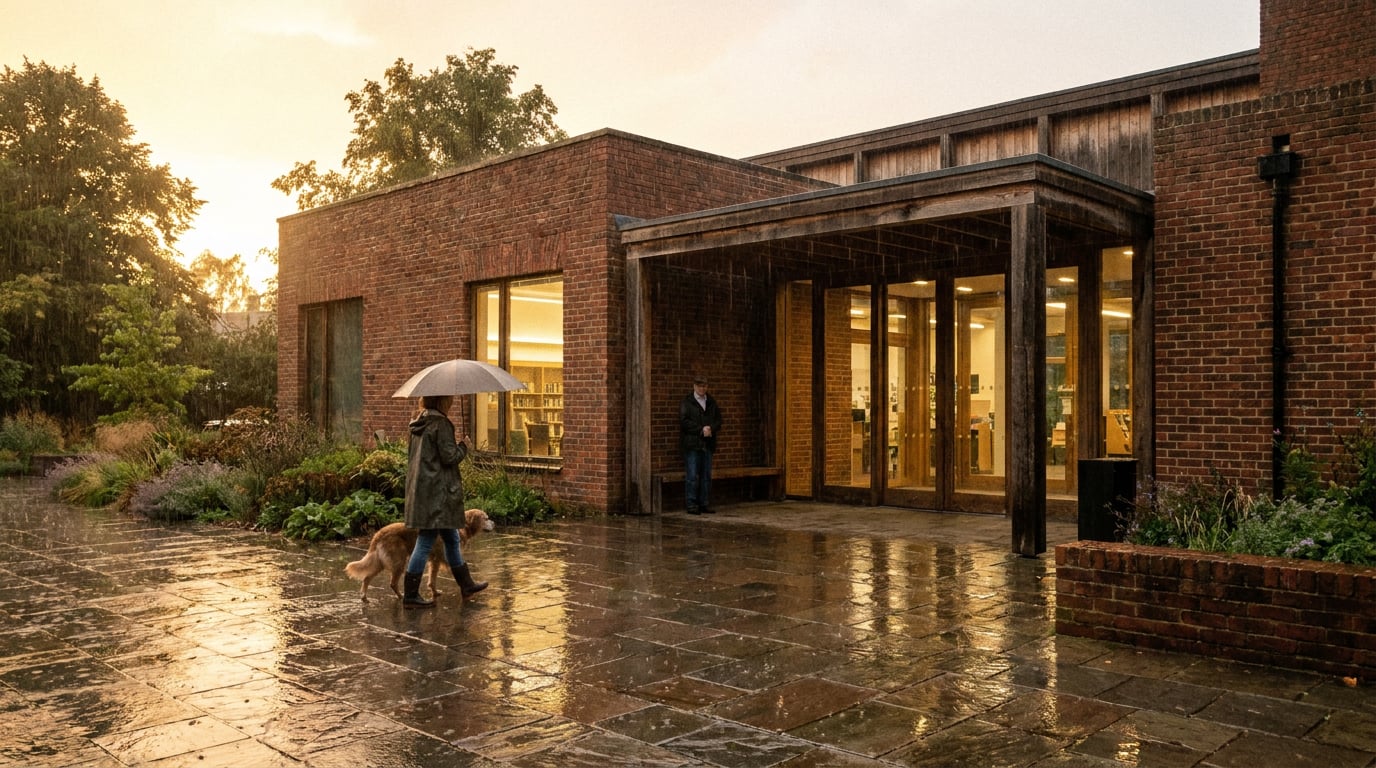
A rainy-day render can sell a scheme better than blue sky. How to build wet ground, honest reflections and a believable overcast sky, then relight what you already have.
Why a Rainy Render Sells Harder Than Blue Sky
 A wet street reads as a real place on a real Tuesday. That is the quiet argument behind most good rainy renders, and it is why planning committees, juries and crit panels respond to them. They have seen a thousand golden-hour hero shots. They have seen the same long shadows, the same cloudless gradient, the same couple walking a dog across a lawn that will never be that green. A grey, damp, lived-in image breaks the pattern, and a Design and Access Statement is, in the end, an argument that the scheme belongs in ordinary conditions rather than ideal ones.
There is a practical reason too. Rain collapses the contrast range. Overcast light is soft and close to shadowless, so massing, material and facade rhythm carry the image instead of hard shadows hiding weak detail. If your elevation is well proportioned and your reveals are properly considered, a flat grey sky shows them off. If the detailing is thin, rain will expose it, which is useful to learn before the committee does.
Wet surfaces also give you depth for free. Reflections repeat the building, pull the eye down and tie the scheme to the ground plane. A dry plaza is a flat grey rectangle in a render. A wet one becomes a second image of the facade, and that doubling does a lot of compositional work without adding a single element.
### When rain is the wrong call
Rain is not a universal upgrade. It suits civic, cultural, public-realm and urban-infill work, where the argument is about street life, enclosure and how a building meets the ground. It is a poor choice for a housing scheme pitched on daylight and amenity, where the client wants to see sunlit gardens and usable balconies. It is also wrong for a competition entry that needs to project optimism, and for any client who has said they want warmth. A moody, mood-only render for someone who asked for welcome is a mismatch, however good it looks.
A wet street reads as a real place on a real Tuesday. That is the quiet argument behind most good rainy renders, and it is why planning committees, juries and crit panels respond to them. They have seen a thousand golden-hour hero shots. They have seen the same long shadows, the same cloudless gradient, the same couple walking a dog across a lawn that will never be that green. A grey, damp, lived-in image breaks the pattern, and a Design and Access Statement is, in the end, an argument that the scheme belongs in ordinary conditions rather than ideal ones.
There is a practical reason too. Rain collapses the contrast range. Overcast light is soft and close to shadowless, so massing, material and facade rhythm carry the image instead of hard shadows hiding weak detail. If your elevation is well proportioned and your reveals are properly considered, a flat grey sky shows them off. If the detailing is thin, rain will expose it, which is useful to learn before the committee does.
Wet surfaces also give you depth for free. Reflections repeat the building, pull the eye down and tie the scheme to the ground plane. A dry plaza is a flat grey rectangle in a render. A wet one becomes a second image of the facade, and that doubling does a lot of compositional work without adding a single element.
### When rain is the wrong call
Rain is not a universal upgrade. It suits civic, cultural, public-realm and urban-infill work, where the argument is about street life, enclosure and how a building meets the ground. It is a poor choice for a housing scheme pitched on daylight and amenity, where the client wants to see sunlit gardens and usable balconies. It is also wrong for a competition entry that needs to project optimism, and for any client who has said they want warmth. A moody, mood-only render for someone who asked for welcome is a mismatch, however good it looks.
Choose the weather for the argument the image is making. Rain suits schemes that are about the street, the public realm and the building as a durable civic presence.
What Wet Actually Does to Materials
 The most common failure in a wet render is the pasted sky. Someone takes a dry, sunlit image, swaps in a grey cloud layer, adds a few puddles and calls it rain. It never convinces, because the materials are still telling the viewer it is dry.
Wetting darkens porous surfaces. Brick, concrete, timber cladding and stone all go deeper in tone and richer in saturation, while the ground takes on a glossy film. You can see this on any street the morning after a shower: the pale limestone is suddenly the colour of wet slate, and the red brick looks almost plum. A convincing wet render shifts every porous material in that direction, not just the paving.
Specular response changes as well, and not uniformly. Smooth surfaces such as glazing, standing-seam metal and polished stone stay crisp, because they were already reflective and a film of water barely alters them. Rough surfaces such as render and board-marked concrete gain a soft sheen, and they streak only where water actually runs. A uniform wet gloss over every surface looks like a plastic model.
### Draw the water to your geometry
Water behaves by geometry. It pools at low points, runs down from sills and copings, and leaves staining below projecting elements. This is where a rainy render becomes a test of the design itself. Draw the streaks to the building you actually designed, not generic drips scattered across the elevation. If there is a coping with no drip detail, the image should show what that means for the wall below it. If there is a deep reveal, the water will track the edge of it.
### Show wet and dry together
One of the most believable details you can add is a wet and dry boundary. A canopy or overhang that keeps a strip of paving dry is a quiet way to show how the scheme handles weather. It tells the viewer that someone thought about arriving at the door with a wet coat, and it costs nothing to include.
The same logic changes by discipline, which is worth bearing in mind when you are choosing what to show:
The most common failure in a wet render is the pasted sky. Someone takes a dry, sunlit image, swaps in a grey cloud layer, adds a few puddles and calls it rain. It never convinces, because the materials are still telling the viewer it is dry.
Wetting darkens porous surfaces. Brick, concrete, timber cladding and stone all go deeper in tone and richer in saturation, while the ground takes on a glossy film. You can see this on any street the morning after a shower: the pale limestone is suddenly the colour of wet slate, and the red brick looks almost plum. A convincing wet render shifts every porous material in that direction, not just the paving.
Specular response changes as well, and not uniformly. Smooth surfaces such as glazing, standing-seam metal and polished stone stay crisp, because they were already reflective and a film of water barely alters them. Rough surfaces such as render and board-marked concrete gain a soft sheen, and they streak only where water actually runs. A uniform wet gloss over every surface looks like a plastic model.
### Draw the water to your geometry
Water behaves by geometry. It pools at low points, runs down from sills and copings, and leaves staining below projecting elements. This is where a rainy render becomes a test of the design itself. Draw the streaks to the building you actually designed, not generic drips scattered across the elevation. If there is a coping with no drip detail, the image should show what that means for the wall below it. If there is a deep reveal, the water will track the edge of it.
### Show wet and dry together
One of the most believable details you can add is a wet and dry boundary. A canopy or overhang that keeps a strip of paving dry is a quiet way to show how the scheme handles weather. It tells the viewer that someone thought about arriving at the door with a wet coat, and it costs nothing to include.
The same logic changes by discipline, which is worth bearing in mind when you are choosing what to show:
| Project type | What the wet image should reveal |
|---|---|
| Civic square | Ponding at low points, pedestrian desire lines, reflected facade |
| Housing | Sheltered entrances, covered bin and cycle stores, usable amenity |
| Conservation | Masonry staining, historic fabric reading honestly in the wet |
| Landscape | Soil, planting, swales and drainage doing their job |
| Interiors | Reflected overcast sky, condensation on glazing, wet entrance mats |
| Infrastructure | Kerbs, falls and runoff made legible |
A wet render is a coherence test. If the water has nowhere sensible to go, the image will show it, and so will the drainage engineer.
Puddles and Reflections That Obey Optics
 Reflections are where a rainy render gets caught out. Viewers may not be able to say what is wrong, but they feel it quickly, and a puddle that shows the wrong thing is the fastest tell of a fake.
The basic rule is geometric. A reflection inverts about the surface plane and sits directly below its source. A puddle in front of a building should show that building upside down, aligned to the same vertical lines, and what it shows depends on where you are standing. A puddle that reflects the part of the facade your camera cannot see from that angle, or one that shows a different building altogether, breaks the image at once.
### Dimmer, softer, distorted
A reflection is never as bright or as sharp as the thing it reflects. Water also reflects more strongly at grazing angles than it does when you look straight down into it, which is the Fresnel effect. Close to the camera, looking down, a puddle is weak and you see through to the ground. Toward the horizon, the same water becomes almost mirror-like. So the puddles near the bottom of your frame should be darker and less reflective, while those further away should pick up more of the sky and facade. These are optical principles, and your own eyes on a wet street are the best check on them. Artistic choices come on top: how much to exaggerate, how much to soften.
### Place puddles where water would collect
Water goes to low points. Put puddles at drainage failures, along kerb lines, in paving joints and in the slight dishing around a gully. Scatter them in varied sizes. Let a few break at the edge rather than forming neat circles, because real puddles follow the contours of the surface and trace the irregular edge of a paving slab. A row of identical ovals reads as a texture applied to a plane.
### Ripples, sparingly
Active rain rings on every puddle read as noise. One or two near a downpipe outfall, or where a stream of water drops from a canopy edge, read as weather. Restraint matters here, because ripple detail draws the eye and you want the eye on the architecture.
### Keep the reflection honest to the light
If the sky is flat grey, the puddle shows flat grey. Do not let a dramatic reflection appear in the water when there is no source for it above. The one saturated note worth reflecting is warm window glow, which gives you a small, controlled accent and ties the interior to the street.
Reflections are where a rainy render gets caught out. Viewers may not be able to say what is wrong, but they feel it quickly, and a puddle that shows the wrong thing is the fastest tell of a fake.
The basic rule is geometric. A reflection inverts about the surface plane and sits directly below its source. A puddle in front of a building should show that building upside down, aligned to the same vertical lines, and what it shows depends on where you are standing. A puddle that reflects the part of the facade your camera cannot see from that angle, or one that shows a different building altogether, breaks the image at once.
### Dimmer, softer, distorted
A reflection is never as bright or as sharp as the thing it reflects. Water also reflects more strongly at grazing angles than it does when you look straight down into it, which is the Fresnel effect. Close to the camera, looking down, a puddle is weak and you see through to the ground. Toward the horizon, the same water becomes almost mirror-like. So the puddles near the bottom of your frame should be darker and less reflective, while those further away should pick up more of the sky and facade. These are optical principles, and your own eyes on a wet street are the best check on them. Artistic choices come on top: how much to exaggerate, how much to soften.
### Place puddles where water would collect
Water goes to low points. Put puddles at drainage failures, along kerb lines, in paving joints and in the slight dishing around a gully. Scatter them in varied sizes. Let a few break at the edge rather than forming neat circles, because real puddles follow the contours of the surface and trace the irregular edge of a paving slab. A row of identical ovals reads as a texture applied to a plane.
### Ripples, sparingly
Active rain rings on every puddle read as noise. One or two near a downpipe outfall, or where a stream of water drops from a canopy edge, read as weather. Restraint matters here, because ripple detail draws the eye and you want the eye on the architecture.
### Keep the reflection honest to the light
If the sky is flat grey, the puddle shows flat grey. Do not let a dramatic reflection appear in the water when there is no source for it above. The one saturated note worth reflecting is warm window glow, which gives you a small, controlled accent and ties the interior to the street.
Weak looking down, strong at the horizon. Dimmer and softer than the source. Honest to the sky above it. Get those three right and the puddles work.
Moody Skies, Wet Light and Atmosphere
Light a wet scene with one dominant source. Heavy cloud cover works as an enormous soft light, and warm interior glow through glazing becomes the only accent. That restraint is what makes the image feel moody rather than just dark. Dusk and blue hour suit rain well for exactly this reason: the interior lighting starts to read against the cooling sky, and the building begins to glow from within. ### Build depth in haze Rain fills the air with moisture, and distance falls away into it. Let distant buildings and trees dissolve into cool grey, hold the middle ground in good saturation, and keep the foreground sharpest. This layering gives you depth without needing a single extra element, and it directs attention to the part of the scheme you are actually proposing. ### Choose the sky for the story A low, even overcast says routine rain: an ordinary day, an ordinary street, a building that works in ordinary conditions. A break of light under dark cloud adds drama, with a shaft of sun catching a facade while the rest stays grey. It is striking, but use it once, as the hero image, not as a default across the whole set. Overused, it becomes the rainy equivalent of the golden-hour cliché you were trying to avoid. ### Change the entourage People behave differently in rain. They carry umbrellas, raise hoods, wear darker coats and walk faster. Nobody lingers on the lawn and nobody sits at an outdoor table unless it is under cover. Dry-weather figures dropped into a wet scene break the whole image, because the human cues contradict everything else the light and surfaces are saying. Check every figure against the weather, including the ones in the background. ### Atmosphere with restraint Add faint mist, soft glare on glazing and a hint of rain streak against a dark background. Stop there. Heavy drizzle lines across the whole frame obscure the architecture you are selling, and a render that is mostly weather is a poor use of a presentation sheet. Rain should be a condition the building sits in, not the subject.One dominant light, warm glow as the single accent, distance dissolving into haze, and figures dressed for the weather. That is the whole recipe for believable wet light.
Relighting What You Already Have in Retouch
You do not have to rebuild a dry render to get a wet one. In ArchAdemia Tools, Retouch has six one-click re-light presets: Golden hour, Dusk, Blue hour, Night, Overcast and Sunny. Each regenerates the whole document at a different time of day or weather and lands as a new layer, so the original stays intact. For a rainy image, Overcast and Blue hour are the two to start with. Because the result is a layer, you can compare it with the dry version, mask between them or discard it without losing anything. Treat the preset as a starting point, not a finished image. The craft in the earlier sections is what turns a re-lit render into a convincing one, and Retouch gives you the tools to apply it. ### Refine with a mask and a prompt Select an area, describe what you want, and generative fill lands on a real new layer. This is the way to add a wet-looking patch of paving or darken a stretch of road while leaving the facade untouched. You can also select by typed description, so asking for the paving or the brickwork picks out every matching region without tracing it by hand. Material swap helps when a surface needs to read as wet stone or glossy asphalt against a reference: attach the reference and the swap lands as a toggleable layer. Because these are layers, you can mask them, adjust their blend mode and pull them back where they overreach. Be critical of what comes back. Check that any new puddle sits at a low point, that reflections invert in the right place, and that the wet and dry boundaries make geometric sense. The tool produces the surface. Whether the water makes sense for your building is still your call. ### Recover detail and deepen the grade On a wide render, wet ground sometimes goes soft or repetitive. Enhance area re-renders a selected region at higher resolution with no prompt and composites it back through the selection, which is useful for a foreground of paving that has lost its texture. Then use the Adjust panel, which carries Light, Colour, point curves, HSL bands and effects including dehaze and vignette, to deepen the blacks and pull saturation into the wet materials. An adjustment layer keeps the grade non-destructive and maskable, so you can lift the brickwork without muddying the sky. ### Check the whole set before you commit Do not decide on weather one image at a time. Put the same view in sun and in rain side by side and ask which one makes the argument better. Shoot generates a full set of camera angles for a scheme, exterior and interior handled separately, and a finished set of stills is a complete outcome in itself. Use that set to decide which views earn the weather and which stay dry: the entrance on the street might be strongest wet, while the courtyard looks better in light.Rain is a lighting and surface decision, not a filter. Get the wet ground, honest reflections and one clear light source right, and a grey day makes the scheme look built.
Keep reading.
Try ArchAdemia Tools for yourself
Draw it, model it, render it, publish it. One place, built for architects and small practices. Plans from £19 a month billed yearly (£228 a year), all in.